Windows Server Infrastructure & Active Directory Project
This project demonstrates the design, implementation, and administration of a full enterprise-style Windows Server infrastructure.
The environment was built from scratch in a virtualized setup and includes Active Directory, DNS, DHCP, file and print services, Group Policy Objects (GPOs), advanced permission models, and high-availability concepts.
Table of Contents
- Project Overview
- Environment & Network Design
- Core Infrastructure
- Identity & Access Management
- File Services & Access Control
- Network Services
- Group Policies & User Experience
- Enterprise Features & Resilience
- Project Summary & Key Learnings
Project Overview
This project represents a enterprise Windows infrastructure build, designed to replicate how a real-world corporate IT environment is planned, deployed, and maintained.
The environment simulates a realistic enterprise Windows infrastructure, covering:
- Network design
- DNS, DHCP, Active Directory
- Group management (I‑G‑DL‑P)
- NTFS & Share permissions
- Group Policies (GPO)
- Delegation & security administration
- Redundancy, failover, and recovery scenarios
- Domain: em21.fh.local
- IPv4 subnet: 10.25.21.0/24
Environment & Network Design
Virtualization & Network
All machines were deployed as VMware virtual machines using a Host‑Only network.
- IPv4:
10.25.21.0/24 - IPv6:
FD25:21::/64
The Domain Controller (DC1em) has two network interfaces:
- Host‑Only (internal network)
- Bridged (internet access)
NAT was enabled on the bridged interface so all internal machines could access the internet.
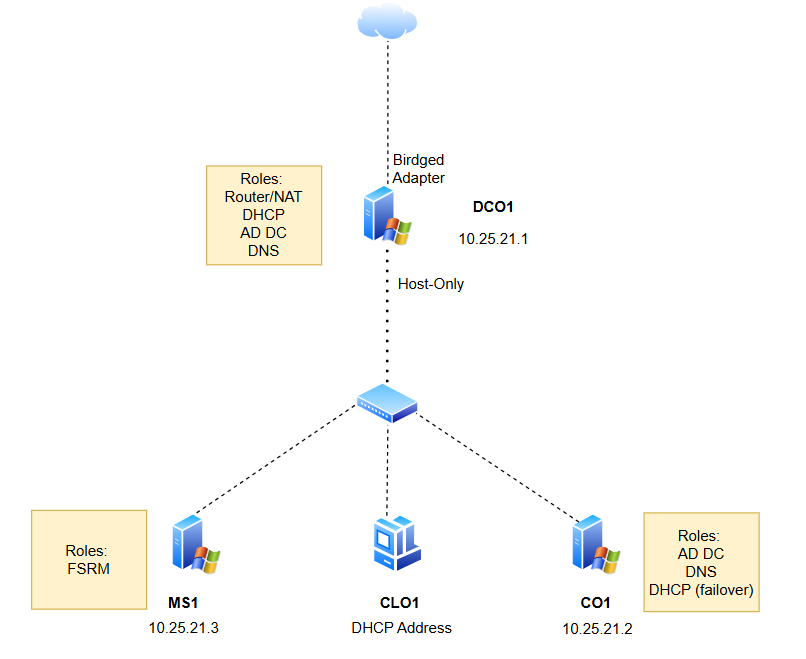 Figure 1: Detailed network topology diagram illustrating the network architecture
Systems Overview
| Hostname | OS | Role | IP Address |
|---|---|---|---|
| DC1em | Windows Server 2025 | AD, DNS, NAT | 10.25.21.1 |
| MS1em | Windows Server 2025 | File Server, WAC | 10.25.21.2 |
| CO1em | Windows Server 2025 Core | DHCP, DNS Replica, DC | 10.25.21.3 |
| CL1em | Windows 11 | Client | DHCP / 10.25.21.10 |
ICMP traffic was enabled on all systems to allow ping and tracert.
Core Infrastructure
System Installation & Networking
The following systems were installed and configured:
- DC1em – Windows Server 2025 (Desktop Experience)
- MS1em – Windows Server 2025 (Desktop Experience)
- CO1em – Windows Server 2025 (Core)
- CL1em – Windows 11
Each system received:
- Static IPv4 and IPv6 addresses
- DC1em configured as default gateway
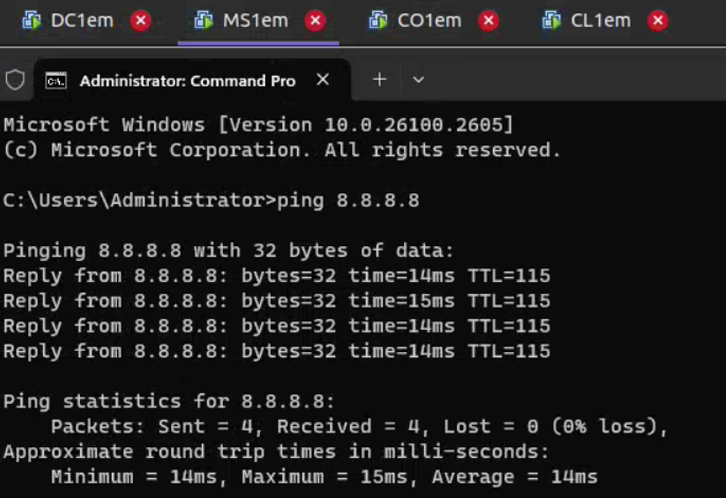 Figure 2: Ping from MS1 to the google.com IP address to verify NAT functionality
DNS Architecture & Name Resolution
DNS was implemented as a core dependency service on DC1em. Forward and reverse lookup zones were created for both IPv4 and IPv6.
Dynamic updates were initially allowed to simplify registration, then restricted to secure updates only once Active Directory was deployed. All zones were converted to AD-integrated DNS zones.
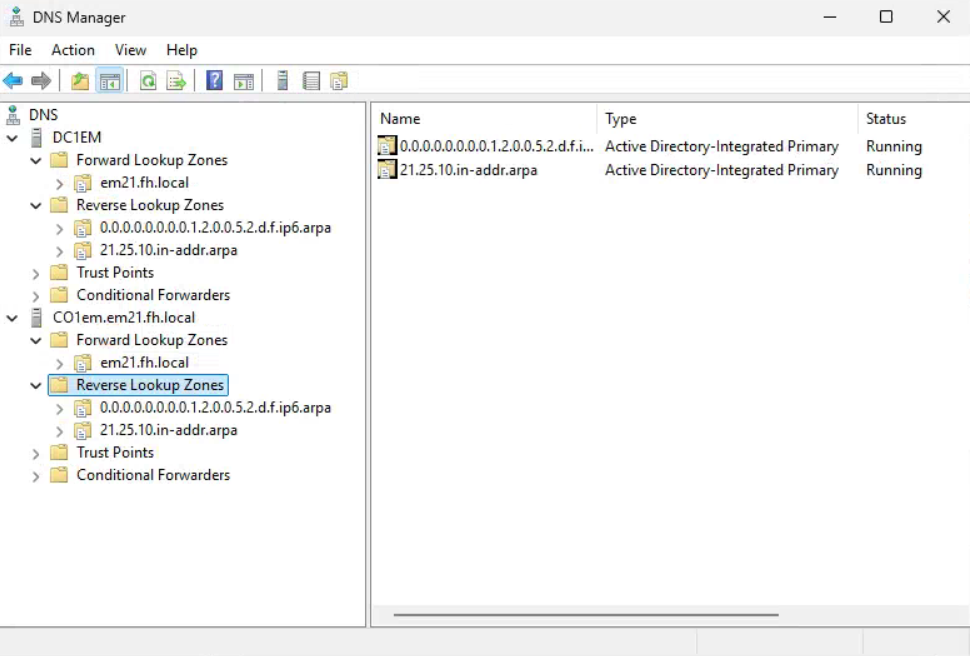 Figure 3: DNS Zones configuration
Active Directory Domain Design
A new Active Directory forest and domain (em21.fh.local) were deployed using the highest supported functional level. DNS was fully integrated to support authentication and service discovery.
All systems were joined to the domain in a controlled sequence to ensure proper DNS registration. SRV records required for LDAP, Kerberos, global catalog access, and password services were explicitly validated.
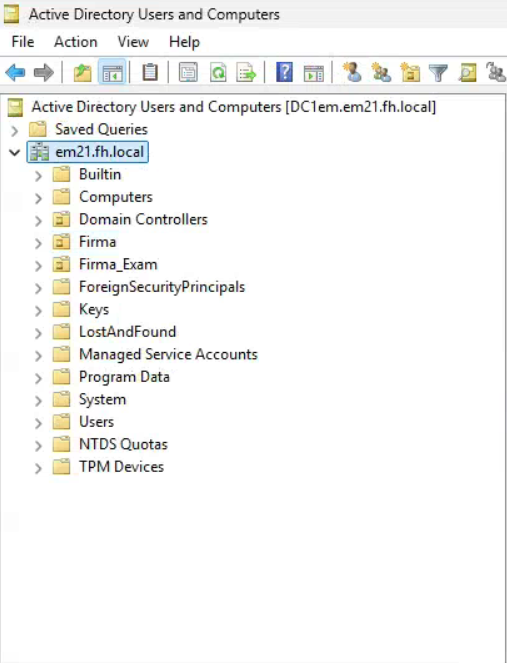 Figure 4: Active Directory domain structure
Remote Administration & Management
Remote administration was enabled early to reflect real operational workflows. Interactive management was performed using Remote Desktop, while WinRM and PowerShell Remoting were used for non-interactive tasks.
Server Core administration was handled entirely remotely, including role installation and DNS configuration.
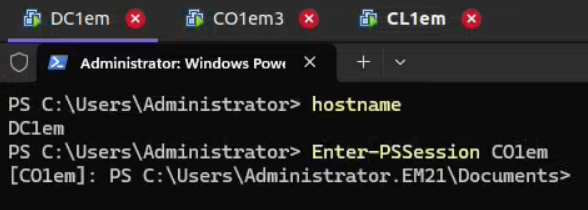 Figure 5: Remote PowerShell session
Identity & Access Management
Group Design & Least Privilege
All permissions were assigned using group-based access following the I‑G‑DL‑P model. Users were never granted permissions directly.
Separate groups were created for administrative users, power users, and standard users. Access was validated using test accounts to confirm effective permissions.
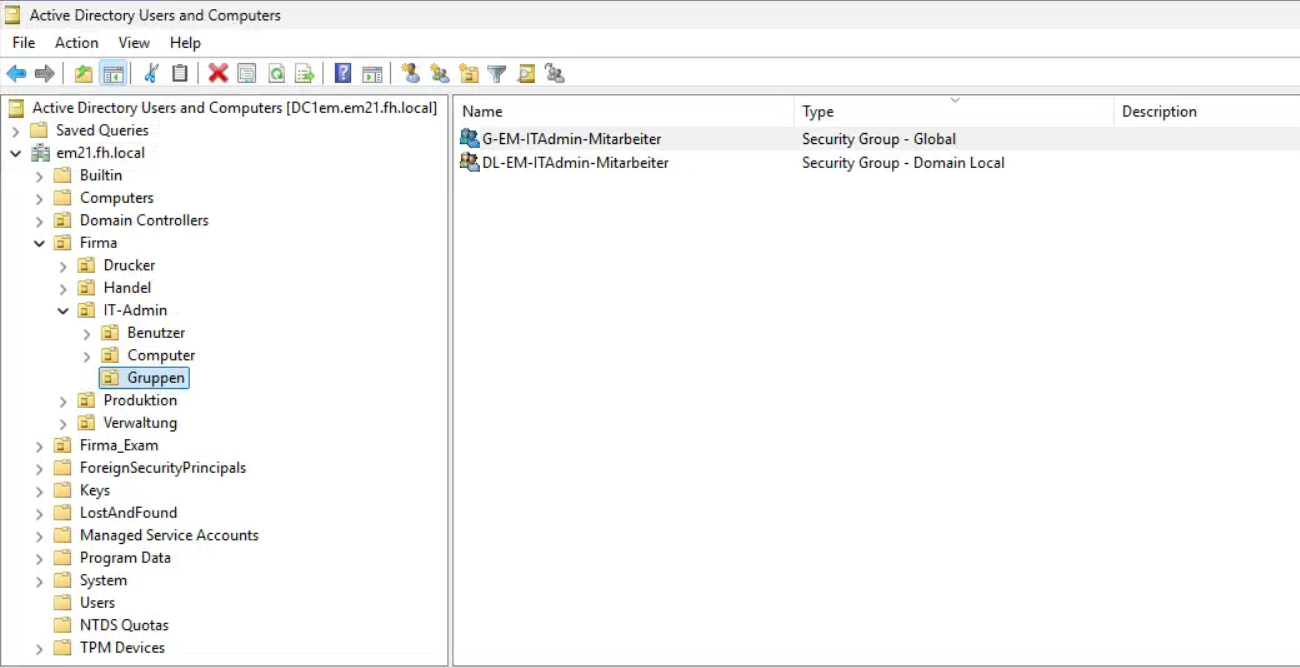 Figure 6: Group structure and scopes
File Services & Access Control
NTFS & Share Permissions
A dedicated data volume was created on MS1em and shared using a layered permission model. NTFS permissions defined access rights, while share permissions provided an additional boundary for remote access.
Permissions were tested both locally and over the network to ensure consistent behavior.
Advanced Ownership & Inheritance Scenarios
Complex scenarios involving file ownership, inheritance breaks, and access recovery were tested. These scenarios simulate real incidents such as user offboarding and sensitive file protection.
Ownership reassignment and permission recovery were performed without granting excessive administrative access.
Network Services
DHCP Configuration & High Availability
DHCP was deployed on CO1em with MS1em configured as a failover partner. Load sharing was set to 50:50, and lease timing parameters were tuned for fast recovery.
Failover behavior was validated by taking one DHCP server offline while clients continued to receive addresses.
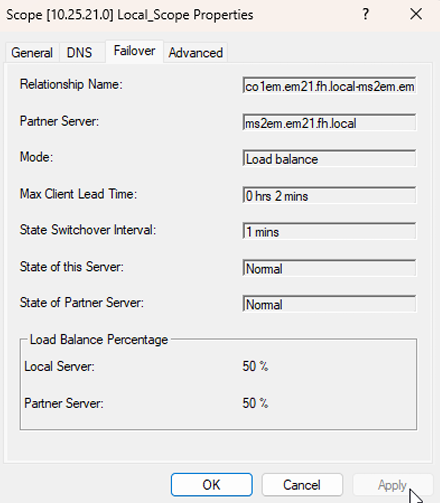 Figure 7: DHCP failover configuration
Group Policies & User Experience
Security Hardening via GPOs
Security-focused GPOs were applied to restrict access to sensitive system features such as Control Panel applets, command execution, and administrative tools.
Policies were scoped carefully to avoid impacting users who required elevated operational access.
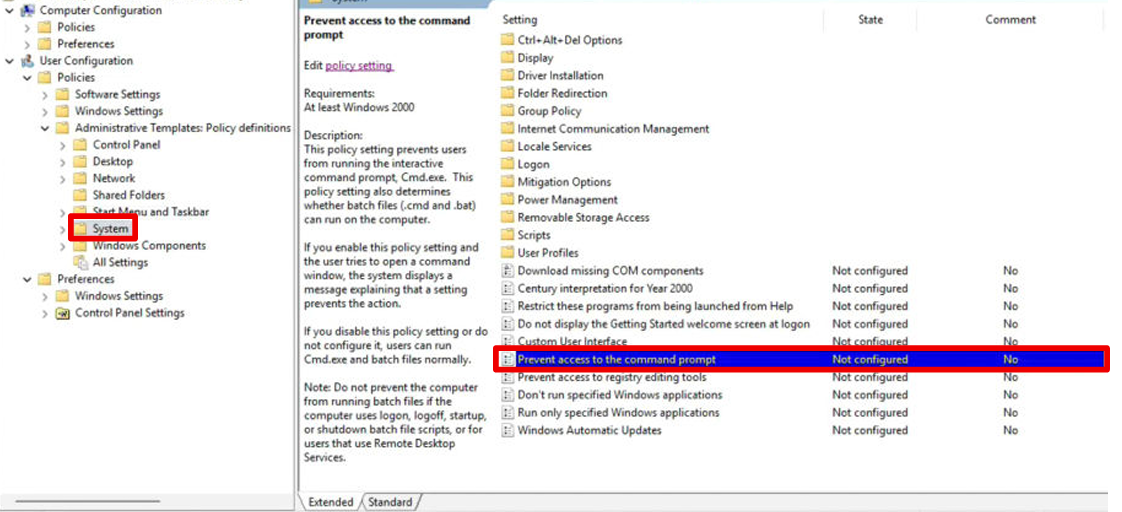 Figure 8: Preventing Access to the CMD
Roaming Profiles & Folder Redirection
Roaming profiles and folder redirection were configured to centralize user data. Disk quotas were applied to prevent uncontrolled storage growth.
Folder redirection ensured user documents were stored on the server while remaining transparent to the user.
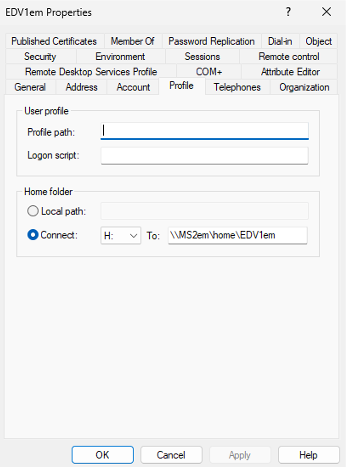 Figure 9: Folder redirection policy
Enterprise Features & Resilience
Additional Domain Controllers & Redundancy
CO1em was promoted to an additional domain controller to remove single points of failure for authentication and directory services. DNS replication between controllers was verified.
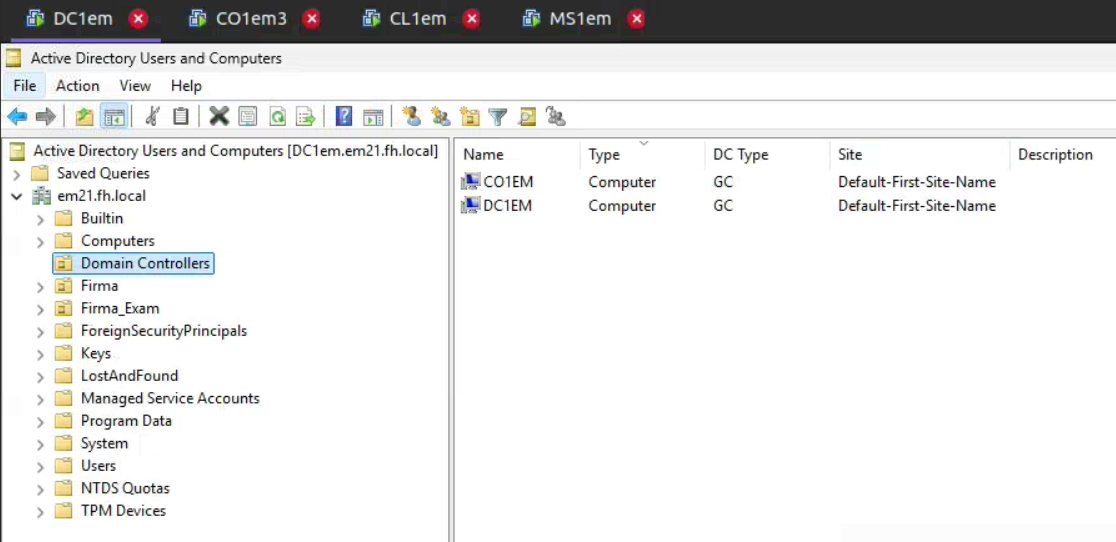 Figure 10: Redundant domain controllers
Monitoring, Recovery & AD Maintenance
Performance monitoring was configured using Data Collector Sets. Active Directory snapshots were created and mounted to inspect historical directory states.
Deleted objects were restored using both low-level directory tools and the Active Directory Recycle Bin.
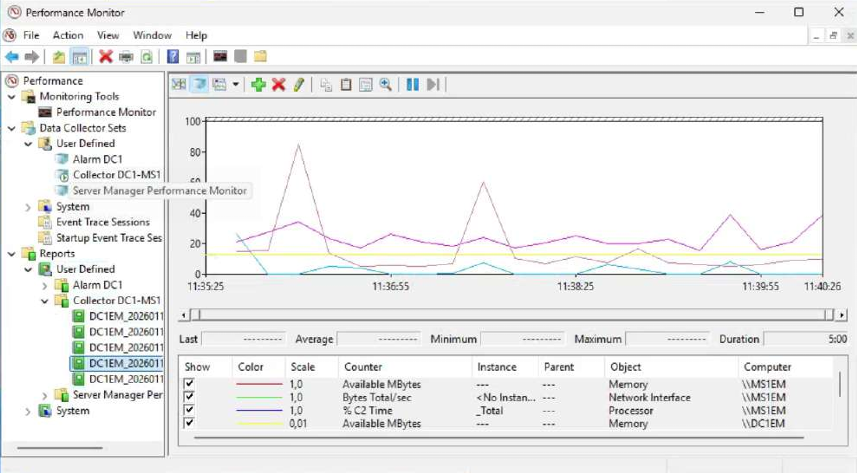 Figure 11: Performance monitoring configuration
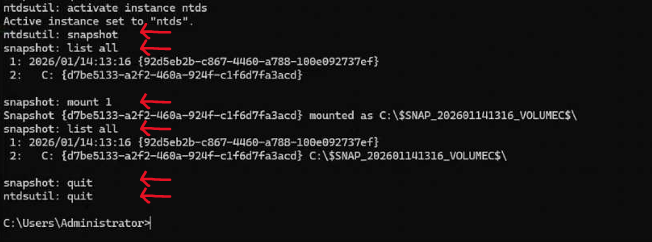 Figure 12: Active Directory snapshot recovery
Project Summary & Key Learnings
This project demonstrates hands-on experience in designing, operating, and securing a Windows enterprise environment. It emphasizes least privilege, redundancy, centralized management, and recovery readiness through real testing rather than assumed correctness.